Why Upgrade to Java 17?
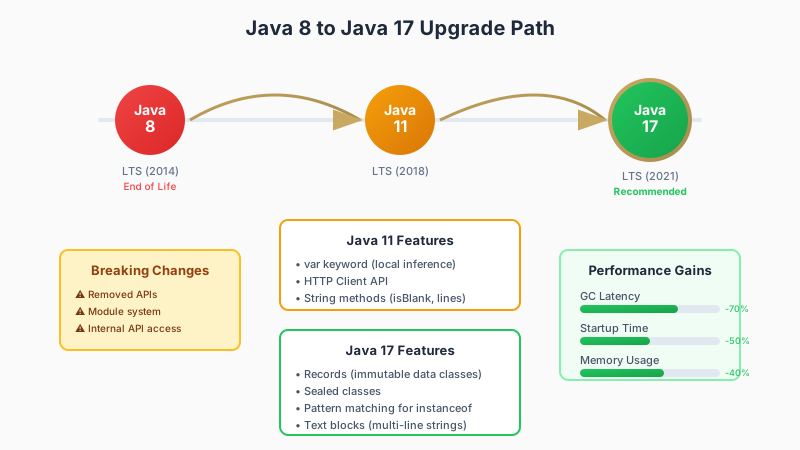
Java 17 is a Long-Term Support (LTS) release, meaning it will receive updates and security patches for years to come. Here's why you should consider upgrading:
- Performance improvements – Significant JVM optimizations
- New language features – Records, sealed classes, pattern matching
- Security updates – Latest cryptographic algorithms and security fixes
- Container support – Better Docker and Kubernetes integration
- End of public updates for Java 8 – Oracle ended free public updates
Key Language Features
Records
Records provide a compact syntax for declaring data-carrying classes:
// Before: Traditional POJO
public class User {
    private final String name;
    private final String email;

    public User(String name, String email) {
        this.name = name;
        this.email = email;
    }

    public String getName() { return name; }
    public String getEmail() { return email; }

    @Override
    public boolean equals(Object o) { /* ... */ }

    @Override
    public int hashCode() { /* ... */ }

    @Override
    public String toString() { /* ... */ }
}

// After: Record
public record User(String name, String email) {}
Sealed Classes
Sealed classes restrict which other classes can extend them:
public sealed class Shape permits Circle, Rectangle, Triangle {
    // Base class implementation
}

public final class Circle extends Shape {
    private final double radius;
    // ...
}
Pattern Matching for instanceof
Eliminate redundant casts with pattern matching:
// Before
if (obj instanceof String) {
    String s = (String) obj;
    System.out.println(s.length());
}

// After
if (obj instanceof String s) {
    System.out.println(s.length());
}
Text Blocks
Multi-line strings are now cleaner:
// Before
String json = "{\n" +
              "  \"name\": \"John\",\n" +
              "  \"age\": 30\n" +
              "}";

// After
String json = """
    {
      "name": "John",
      "age": 30
    }
    """;
Breaking Changes to Watch For
Removed APIs
Several deprecated APIs have been removed:
java.security.aclpackagejava.util.jar.Pack200class- Nashorn JavaScript Engine
- Various
sun.*internal APIs
Module System Considerations
If you're not using the module system, you may encounter:
WARNING: An illegal reflective access operation has occurred
Use the --add-opens flag to allow reflection access during transition.
Migration Strategy
Step 1: Assess Current State
Before upgrading, analyze your codebase:
- Identify deprecated API usage – Use
jdeprscantool - Check dependencies – Ensure all libraries support Java 17
- Review reflection usage – Identify internal API access
- Run static analysis – Find potential compatibility issues
Step 2: Update Dependencies
Update all third-party libraries to Java 17-compatible versions:
<!-- Example: Update Spring Boot -->
<parent>
    <groupId>org.springframework.boot</groupId>
    <artifactId>spring-boot-starter-parent</artifactId>
    <version>3.2.0</version>
</parent>
Step 3: Compile and Test
Compile your application with Java 17:
# Set Java version
export JAVA_HOME=/path/to/jdk-17

# Compile with target 17
mvn clean compile -Dmaven.compiler.release=17
Step 4: Address Issues
Common issues you might encounter:
| Issue | Solution |
|---|---|
| Illegal access warnings | Add --add-opens JVM arguments |
| Removed API usage | Replace with supported alternatives |
| Incompatible libraries | Update to newer versions |
| Reflection issues | Update to new module-aware code |
Performance Tuning
Java 17 introduces new garbage collectors and optimizations:
ZGC (Z Garbage Collector)
For low-latency applications:
java -XX:+UseZGC -Xmx16g MyApplication
Shenandoah GC
Another low-pause-time collector:
java -XX:+UseShenandoahGC MyApplication
Testing Your Migration
Comprehensive Test Suite
Ensure you have thorough test coverage:
- Unit tests for business logic
- Integration tests for API contracts
- Performance tests for regression detection
- Security scans for vulnerability detection
Parallel Running
Run both Java 8 and Java 17 versions simultaneously:
- Deploy Java 17 version to staging
- Mirror production traffic
- Compare responses and performance
- Gradually shift production traffic
Conclusion
Upgrading from Java 8 to Java 17 is a significant undertaking, but the benefits in performance, security, and developer productivity make it worthwhile. Take an incremental approach, thoroughly test at each step, and leverage modern tools to ease the transition.
Need help with your Java upgrade? Request a demo to see how SiliconAgent Transform can automate your migration.